
LINQ Connect
EMS LINQEducation
4.0543.00 Reviews
- Version
- 390.6.19
- Installs
- 100.00K
- Age Rating
- Everyone
Screenshots
Our Review of LINQ Connect
 Analysis by Appyee
Paying for school-related expenses is rarely difficult because of the payment itself. The real annoyance is remembering the deadline, finding the correct account, and making sure meal money is available when a child needs it. LINQ Connect approaches that everyday problem as an education app from EMS LINQ, giving families a mobile place to handle school fees and add money to meal accounts. After using it as a practical household tool, I found its value less about entertainment and more about reducing small administrative tasks that are easy to postpone.
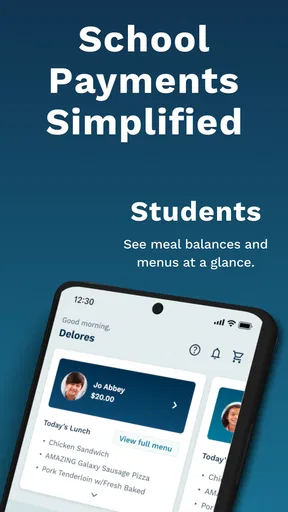
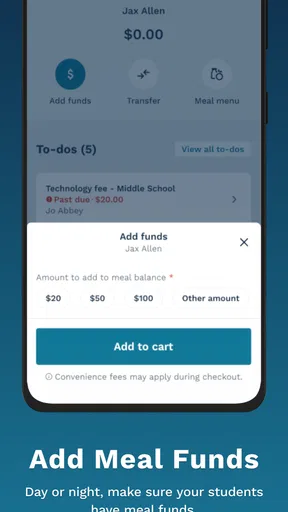
The app is free and aimed at an Everyone audience, so it is designed for ordinary family use rather than a specialist school-office workflow. Its store summary focuses on paying school fees and funding meal accounts from wherever you are, and that describes the central experience accurately without making the app sound more complicated than it is. If your school or district uses the LINQ system, this can be a convenient bridge between home finances and school services. If your school does not use it, the app’s usefulness is naturally much narrower.
How LINQ Connect feels during everyday use
I find LINQ Connect most useful when a school payment is a small task woven into an already busy day, rather than something I want to manage as a separate project. In this section, I’ll focus on the practical choices that make those short visits feel more orderly, especially when several family members share responsibility. That everyday routine also raises a bigger question: what should I look for before trusting an app with school-related payments?
Speed expectations when a payment is urgent
My first impression is that LINQ Connect is built for short, purposeful visits. I would not open it to browse or spend time exploring. The sensible workflow is to launch it, find the relevant school payment or meal account, complete the task, and leave. That focused design matters when you are standing in a supermarket, preparing for the school morning, or trying to resolve a balance after receiving a reminder.
The app has a current version listed as 390.6.19 and supports devices running Android 7.0 or later. Those details suggest that it is not restricted to recent phones, which is useful for families sharing older devices or keeping a dependable handset for household administration. Still, supported software does not automatically mean identical performance on every phone. An older device may take longer to open screens or switch between account areas than a newer one, especially if the phone is already busy.
I would judge its speed by the complete task rather than by the launch alone. A payment app can appear quick while still feeling slow if the user has to search for the right student, account, or school service. The most important question is whether the path from opening the app to confirming the intended transaction feels clear. For LINQ Connect, the strongest use case is a known, repeat action: adding money to a meal account or returning to a school fee that you already understand.
A useful habit is to check the account before the last possible moment. That is not a criticism unique to this app; any service involving school records and payments may depend on information being processed outside the phone. Giving yourself a little time makes it easier to notice an unexpected balance, verify the selected account, or try again if the connection is slow. I would avoid treating a successful-looking tap as the end of the process until the app shows a clear confirmation or updated account state.
What happens during heavy-use moments
The stressful scenario is easy to imagine. It is the evening before a school day, you discover that a meal account needs money, and several other family tasks are competing for your attention. In that moment, LINQ Connect is most useful when you already know which account needs funding and have the necessary payment details ready. The shorter the decision-making inside the app, the less its performance matters.
Heavy use can also mean repeated household activity rather than one unusually large action. A parent may check more than one child, pay a school fee, then return to a meal account. That is where organization becomes more important than raw speed. I recommend pausing after each completed step and checking that the selected child or account is the one you intended. A quick interface is not helpful if a rushed user chooses the wrong destination.
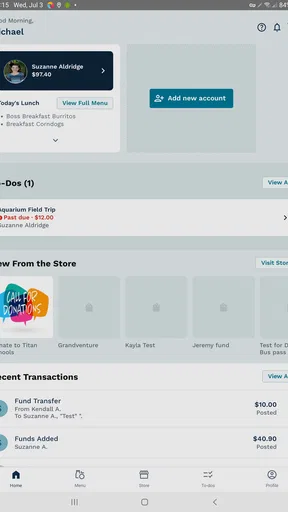
Families with several children should treat the app as a record-checking tool, not just a payment button. Before confirming anything, compare the displayed account context with the school notice or your own notes. This is one of the less obvious advantages of handling the task from a dedicated education app: the payment is connected to the school-related purpose instead of being buried among general banking transactions. The trade-off is that you have to stay attentive to which school account is active.
I also would not rely on a last-minute attempt when the school day is about to begin. Network conditions, account updates, or a temporary service interruption can turn a simple top-up into a stressful problem. Using the app earlier gives you time to recover without immediately needing to contact the school or find another arrangement. That is a practical performance tip, even when the app itself feels responsive.
Reliability and recovering from an interrupted task
For this kind of app, reliability means more than staying open. It means helping the user understand whether an action was completed, avoiding confusion after a failed connection, and making it possible to return to the correct account. I pay close attention to that recovery experience because payment-related uncertainty is more frustrating than a slow screen.
If the app stops responding or the connection drops, my advice is not to repeat the payment immediately. First, reopen the relevant account and look for an updated balance or confirmation. Repeating an action without checking can create unnecessary uncertainty about whether the first attempt went through. This cautious workflow is especially important when funding a meal account before school, when there may be little time to sort out duplicate-looking activity.
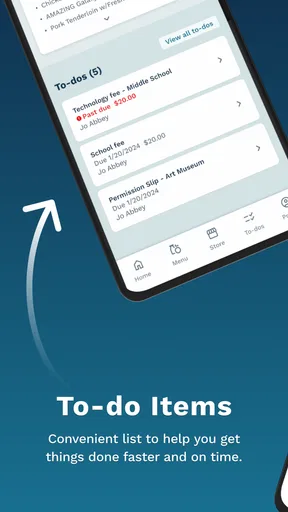
LINQ Connect has a meaningful advantage over a paper form or a general-purpose email exchange: it places the task in a dedicated digital channel that you can revisit. That makes it easier to build a routine around checking balances and handling fees. However, it should not be mistaken for a replacement for every school communication. If a school sends a message about a specific fee, deadline, or account issue, I would still keep that message available while using the app, because the app’s payment function and the school’s explanation serve different purposes.
The app has attracted an average rating of 4.0 from around two thousand ratings, along with hundreds of written reviews. I see that as a sign of a generally useful but not universally frictionless experience. A rating in that range fits an app whose value depends heavily on whether a user’s school is connected to the service and whether the person’s particular payment task behaves as expected. It is encouraging, but I would not interpret it as a guarantee that every family will have the same experience.
Its adoption is also substantial, with over one hundred thousand installs. That gives me more confidence that LINQ Connect is an established tool rather than an obscure experiment, but popularity does not remove the need for careful account verification. The best measure for a parent is still simple: can you complete the school-related task, see what happened, and return later without confusion?
Device constraints and practical setup choices
Because the minimum operating system is Android 7.0, the app can serve people who do not replace their phone frequently. That is helpful in a household where one person uses a newer phone and another relies on an older model. At the same time, older hardware may have less available memory, slower storage, or a less reliable connection. I would keep the phone’s system updated where possible and close unrelated apps if LINQ Connect feels sluggish.
I would also reserve enough free storage for normal app operation and avoid using the app while the phone is switching aggressively between weak Wi-Fi and mobile data. Those are general device habits, not claims about a special requirement from LINQ Connect. They matter because an education payment task is usually short, and a small interruption can feel disproportionately disruptive when the user is in a hurry.
Resource demands are best considered in context. LINQ Connect is not the sort of app I would expect to keep open for long sessions. Its role is occasional administration, so battery use during a brief visit is less important than whether the phone can launch it reliably when needed. If your device is very old and already struggles with basic apps, the supported operating system alone should not be treated as proof of a smooth experience. A newer phone will generally give more comfortable multitasking, while an older one may still be perfectly adequate for a simple payment check.
One setup decision makes a noticeable difference: use an account and device arrangement that the household can manage consistently. If several adults handle school expenses, agree on who checks the balance and who completes a payment. That avoids the common problem of one person assuming the other has already added funds. The app can centralize the task, but it cannot replace a clear family routine.
Privacy and security also deserve ordinary, practical attention. I would use a personal device, avoid leaving an active payment session open in a shared environment, and review the selected account before confirming. These are sensible precautions for any financial or school-service app. They are particularly worthwhile here because the convenience of paying from anywhere can encourage rushed use in public places.
Where it beats the usual alternatives
The most obvious alternative is contacting the school office or sending a payment through a paper-based process. LINQ Connect is more convenient when the school has enabled the service and you need to act outside office hours or while away from home. The app turns a task that might otherwise require a phone call, a visit, or a form into something you can handle during a normal household routine.
Another alternative is using a general banking app and then contacting the school separately. A bank is better for broad money management, transaction history, and household budgeting. LINQ Connect is better when the goal is specifically connected to a school fee or meal account. Its narrower purpose is also its limitation: it is not a full replacement for banking, budgeting, or school communication tools.
Compared with a school website opened in a mobile browser, a dedicated app can feel more direct for repeated actions. You do not have to begin by finding the correct page every time, and the task is presented in a mobile-oriented setting. On the other hand, a browser may be preferable if you rarely make payments, use several school systems, or do not want another app on your phone. For a family that funds meal accounts regularly, the dedicated approach makes more sense than repeatedly searching through a website.
The most important trade-off is compatibility. LINQ Connect is a strong choice when your school or district participates and your main needs are school fees and meal funding. It is not the right choice simply because it is free. If your school uses another payment provider, or if you need detailed household budgeting rather than school transactions, a different tool will serve you better.
Who will benefit most from the app
I would recommend LINQ Connect to parents and guardians who want one repeatable place for school-related payments. It is especially practical for people who travel, work irregular hours, or prefer handling administrative jobs from a phone rather than waiting for office hours. The ability to add money to a meal account without being physically at school is the central convenience, and it can remove a surprisingly persistent source of morning stress.
It can also help a caregiver who is responsible for one part of a child’s school expenses but does not manage the rest of the family budget. A dedicated school payment channel makes the purpose of the transaction clearer than a generic transfer. That clarity can be useful when several adults contribute to the same child’s needs, although everyone should still agree on how completed payments are communicated.
I would be more cautious about recommending it to someone who only needs a one-time payment and already has a simple school website process. Installing and learning another app may not be worthwhile in that case. Likewise, families who need extensive financial reporting, shared budgeting controls, or a broad overview of all expenses should look to a banking or budgeting solution alongside, rather than instead of, this app.
My performance verdict after regular practical use
LINQ Connect succeeds when it stays in its lane. It is a focused education app for school fees and meal accounts, not an all-purpose family finance platform. I found the strongest value in the repeat workflow: check the relevant school account, make the intended payment or top-up, verify the result, and return to normal life. That process is much more useful than a long list of extra features would be.
Its performance should be judged with realistic expectations. On a compatible phone with a dependable connection, it is suited to brief administrative sessions. Older devices may feel less immediate, and any service involving school account updates can introduce waiting that is outside the phone itself. The safest approach is to act before the deadline, confirm the outcome, and avoid repeating an uncertain transaction without checking first.
The free price and Everyone rating make it easy to consider, while the broad Android compatibility lowers the barrier for households with older devices. EMS LINQ has built an app around a specific problem, and that specialization is its main strength. The same specialization means it only becomes genuinely valuable when your school’s payment process fits it.
My final recommendation is straightforward: install it if your school uses LINQ Connect and you regularly manage meal money or school fees. Use it as a dependable routine rather than an emergency button, and keep school notices nearby when a payment has unusual details. If your needs are broader than school transactions, or your school uses another system, choose the tool that matches that reality. For the families it serves, this is a practical way to make an easily forgotten responsibility faster to handle and easier to repeat.
Verdict
Strengths of LINQ Connect
- Quickly view account balances, bills, and payment history.
- Supports convenient bill payments directly from your mobile device.
- Outage reporting makes it easy to notify the utility about service issues.
- Usage information can help customers monitor electricity consumption.
- Push notifications can provide timely updates about account activity.
Limitations of LINQ Connect
- Features may vary depending on the participating utility provider.
- Requires an active LINQ Connect or utility account to use most tools.
- Payment processing may include fees depending on the selected method.
- Some users may find the interface less intuitive on smaller screens.
- App usefulness is limited for customers outside supported service areas.
Similar Picks in This Category
View All
Duolingo: Language Lessons
Duolingo4.7

Google Classroom
Google LLC2.8

Unacademy: Learn & Crack Exams
Unacademy3.2

Bible App for Kids
Life.Church4.4

Cake - Learn English & Korean
Cake Corp.4.7

Brainly: AI Homework Helper
Brainly4.5
Frequently Asked Questions
What is LINQ Connect, and what can I use it for?
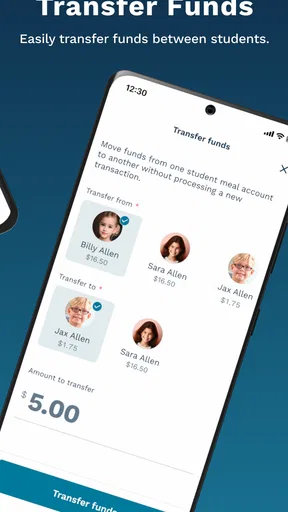
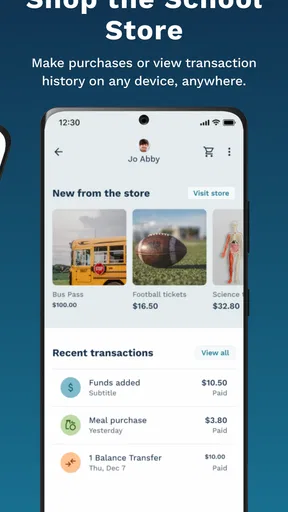
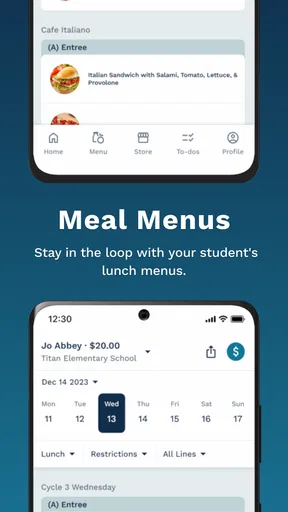
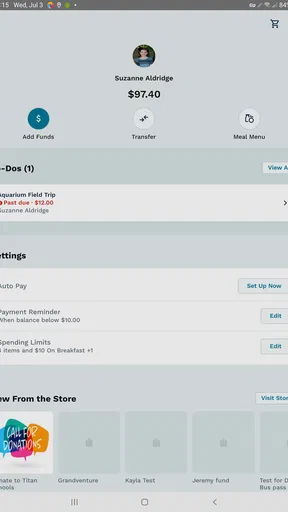
LINQ Connect is a digital platform designed to help families manage school-related services in participating districts. Depending on your school system, you may be able to view cafeteria menus, add money to a student meal account, check balances, review transaction history, manage notifications, and access other district services. Available features can vary, so confirm that your school or district supports LINQ Connect before downloading and creating an account.
How do I create a LINQ Connect account and connect my student?
After installing LINQ Connect, you generally create an account using an email address and password, then select or search for your participating school district. To connect a student, you may need information supplied by the school, such as a student ID, account number, or other identifying details. The exact setup process differs between districts, and some schools may provide enrollment instructions or require account verification before all features become available.
Can I use LINQ Connect to pay for school meals?
In supported districts, LINQ Connect allows parents or guardians to add funds to a student’s cafeteria or meal account using an available payment method. Before making a deposit, review the displayed processing fees, minimum amounts, and payment confirmation details. Deposits may not appear instantly in every school system, particularly during busy periods, weekends, or maintenance windows, so keep your receipt and check the student balance afterward.
Is LINQ Connect free to download and use?
The LINQ Connect app may be free to download, but some account services can involve transaction or convenience fees, especially when adding money to a student meal account. Fees and supported payment methods are determined by the participating school district and may change over time. Review the final amount shown before confirming a payment, and remember that mobile data charges from your carrier may also apply.
Is LINQ Connect safe for managing student and payment information?
LINQ Connect is intended to provide authenticated access to school-service and payment features, but users should still follow basic security practices. Download the app only from the official Google Play Store or Apple App Store, use a strong unique password, protect your device with a passcode or biometric lock, and avoid entering payment details on public networks. Keep the app updated and contact your school district or LINQ support if you notice unfamiliar activity.
